Bracketeer

Bracketeer
License:
Trial version
Language:
English
Developer:
Developer's website
OS:
Mac OS X
Updated:
See detailed info

Softonic review

Cyril Roger

“Tonemapping for Mac”

by Cyril Roger about Bracketeer

Anyone familiar with photography will know about bracketing which consists of taking the several shots of the same subject with different exposures.

Using a technique known as tonemapping, you can create what is called HDR images, which not only taking all shadows and contrast but different light levels.

This makes for impressive shots which you could never obtain normally. Sunrise and sunsets offer for perfect HDR images.

Bracketeer itself is the front-end GUI of Enfuse,a free utility that performs tonemapping.

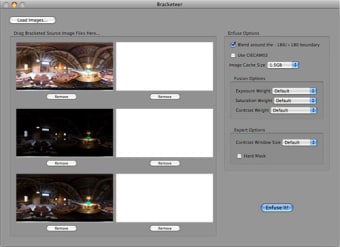
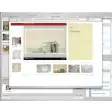
It's very easy to use: just drag your different shots into the brackets and set the fusion options like exposure, saturation and contrast weight.

Once your happy with the settings press 'Enfuse It' to obtain your HDR image if Tiff format.

Most users will find Bracketeer simple to work with.

Yet we do think it lacks advanced options, as it only features one expert option, which is to contrast the window size. We were also a little disappointed to learn that Bracketeer only handles Tiff and Jpeg and can only export in the first format.

Despite limited export options and the fact that it only handles two formats, Bracketeer is a simple application to create great looking HDR images.

Pros
  • Easy to work with
  • Good results
Cons
  • Limited expert options
  • Only handles Tiff and Jpeg
Download Bracketeer 4.3.1

Bracketeer is virus free

We have analyzed the latest version of Bracketeer with 30 antivirus engines and it is virus free. See analysis results.

TESTED VIRUS FREE - Softonic GUARANTEED

Developer's description

Bracketeer is a front-end GUI for Enfuse. Enfuse is a command-line freeware utility which uses multiple exposures of a scene (bracketed exposures) and merges them together to form a uniformly lit scene.

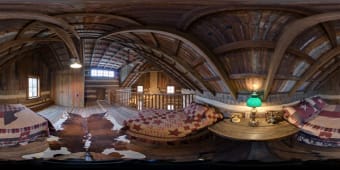
It is similar to tonemapping with an HDR image except that no HDR image is ever created, and there is no ghosting. It works with any kind of bracketed image set, not just panoramic equirectangular images.

Review and rate Bracketeer

Your avatar

Your opinion is important.
Help other users - be the first to review this program.

Review
  1. Maximum: 75 characters

  2. See example

Pros and Cons
Rate
  1. What rating would you give Bracketeer?

    You need to fill in all fields

    • Usability:

      Not rated
    • Stability:

      Not rated
    • Installation:

      Not rated
    • Functionality:

      Not rated
    • Appearance:

      Not rated
    • Overall rating:

      Not rated
  2. Don't worry, we won't make your email address public.

You're not allowed to share serial numbers, cracks, etc. or link to pages that contain them. If you do, your user account will be deleted, your IP address logged and legal action will be taken.

Get started - just ask a question!

Write a title for your question.

Alternativesto Bracketeer

  • In English:
    HyperDither
    HyperDither

    From color to black and white

    Softonic rating:
    • 6/10
    User rating:
    • 10/10
  • Free:
    Color Oracle
    Color Oracle

    A tool for color blind people

    Softonic rating:
    • 9/10
    User rating:
    • 0/10
Compare with Bracketeer

Screenshots from Bracketeer

Download rank: Image Retouching & Optimization

52 of 61

Softonic rating:
  • Very good
  • 8/10
Your rating:
Your rating
  • 0

Review and rate this program

Blog posts about Bracketeer

More

Top Downloads: Image Retouching & Optimization

  • United States
  • Global

  1. The industry standard image editing tool

Older versions of Bracketeer

Reviews of Bracketeer in other languages